Roles & Permissions
Ticku's access model has three tiers:
Tier 1 — Platform Admin (cross-tenant)
User.isPlatformAdmin is a tenant-less super-role for operating the platform itself: create/approve/suspend tenants and grant platform-admin. It grants no workspace access on its own. See Tenants & Platform Admin.
Tier 2 — Tenant Admin (per membership)
Each Membership (a user's link to one tenant) carries an isAdmin flag. It unlocks the tenant's admin panel — users, projects, roles, tags, custom attributes, statuses, calendar, webhooks, email. The same user can be admin in one tenant and a plain member in another.
Tier 3 — Per-Project Dynamic Roles
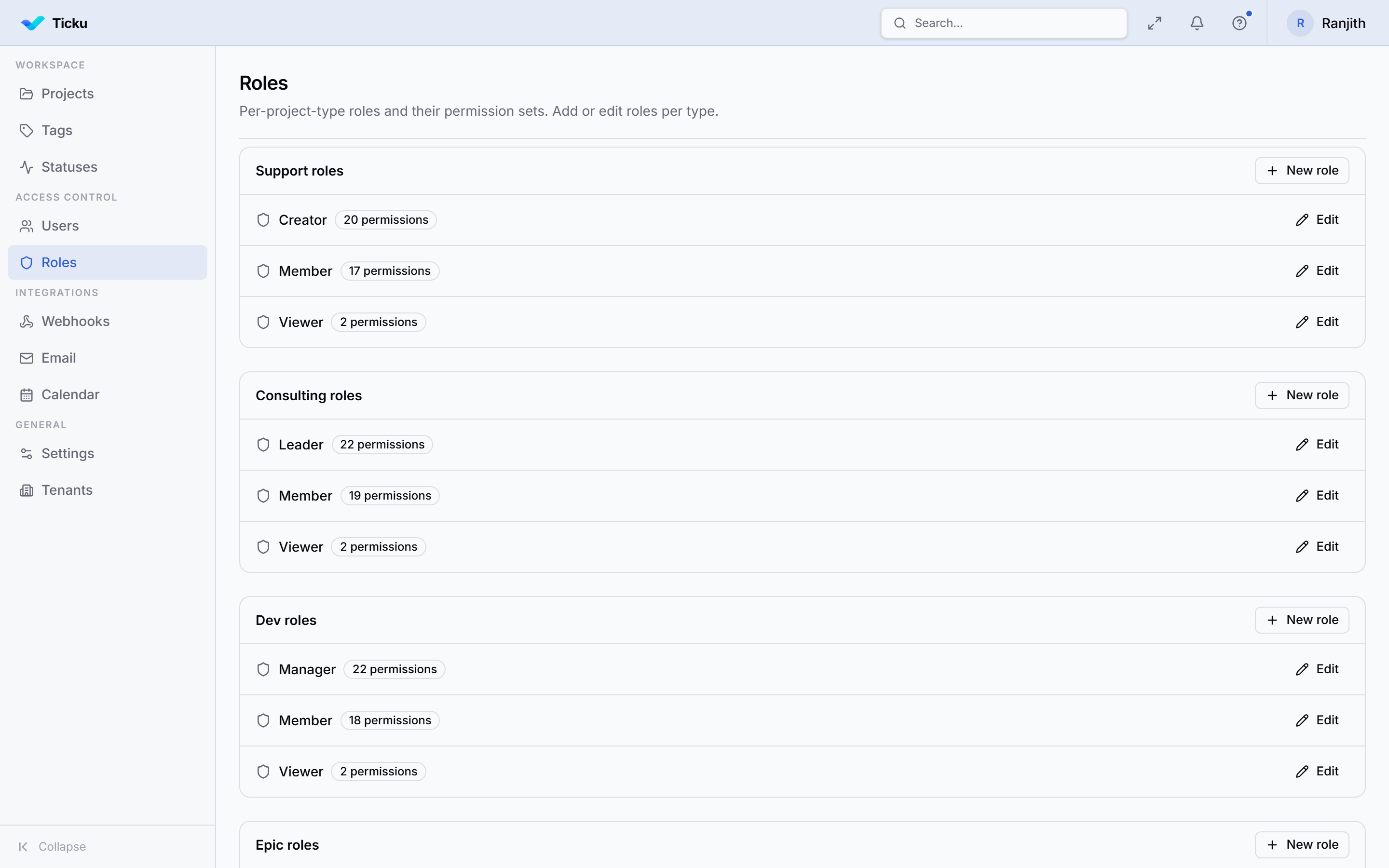
Every project member holds one role. Roles are no longer a fixed Creator/Member/Viewer enum — they are rows in ProjectRole, each holding a set of permission codes, and they are scoped to the project type. Admins edit them in Admin → Roles.
- Roles are seeded per project type with sensible defaults (marked
isSystem). - Admins can rename roles, change descriptions, and toggle individual permissions.
- Authorization is driven entirely by the permission codes a role holds — the role name is for display only.
The permission catalog
Every per-project permission code, grouped as shown in the role editor:
| Group | Codes |
|---|---|
| Subjects (folders) | subjects:create, subjects:update |
| Tickets | tickets:create, tickets:update, tickets:assign, tickets:archive, tickets:escalate |
| Ticket status | tickets:status:{STATUS} — one per status (OPEN, ASSIGNED, IN_PROGRESS, ON_HOLD, DEFERRED, REVIEW, FIXED, CLOSED, REOPENED) |
| Sub-tasks | tasks:read, tasks:create, tasks:update |
| Comments | comments:create, comments:update_own |
| Attachments | attachments:upload, attachments:delete_own, attachments:delete_any |
| Time tracking | time:log |
(Codes are prefixed workspace: internally, e.g. workspace:tickets:create.)
:::note Some capabilities are intentionally not permission-toggles
- Deleting subjects, tickets, and sub-tasks has no UI — the mutations exist but no role can hold the codes, so they fail closed.
- Comment deletion is hardcoded to "your own comments only" and ignores permissions entirely.
- Attachment delete codes exist and work, but are granted to no default role — switch them on per-tenant from the role editor if wanted. :::
Default roles by project type
| Type | Roles (lead → viewer) | Notes |
|---|---|---|
| Support | Creator · Member · Viewer | Creator opens/closes & owns folders but doesn't edit/assign; Member works tickets |
| Consulting | Lead · Member · Viewer | Lead & Member can log time |
| Dev | Lead · Member · Viewer | Same as Consulting minus time logging |
| Epic | Lead · Viewer | No Member tier; Viewer is fully read-only (can't comment) |
Only the lead-tier role of each type may escalate and move tickets to Closed / Reopened / Deferred by default. Working members get the intermediate statuses only.
Enforcement
- Server-side, always. Every tRPC mutation asserts the required permission (
assertProjectPermission) before touching data; the UI's hidden/disabled buttons are convenience, not security. - Shared catalog. A single permission catalog is imported by both the server (assertion) and the client (UI gating and the role editor), so they cannot drift.
- Ownership checks. Comment edits verify the author.
- Tenant isolation wraps everything — see Security & RBAC.
Changing a project's type
If an admin changes a project's type, existing members' roles are re-mapped to the closest-seniority role of the new type (viewer stays viewer; lead maps to lead, etc.), so no one is stranded.