Master Calendar
The master calendar defines your tenant's working days, support hours, and holidays. It is the foundation for business-hours-aware SLA and due-date maths. Manage it at Admin → Calendar (/admin/calendar).
Each tenant has exactly one master calendar. It is built from regions, weekend rules, and holidays.
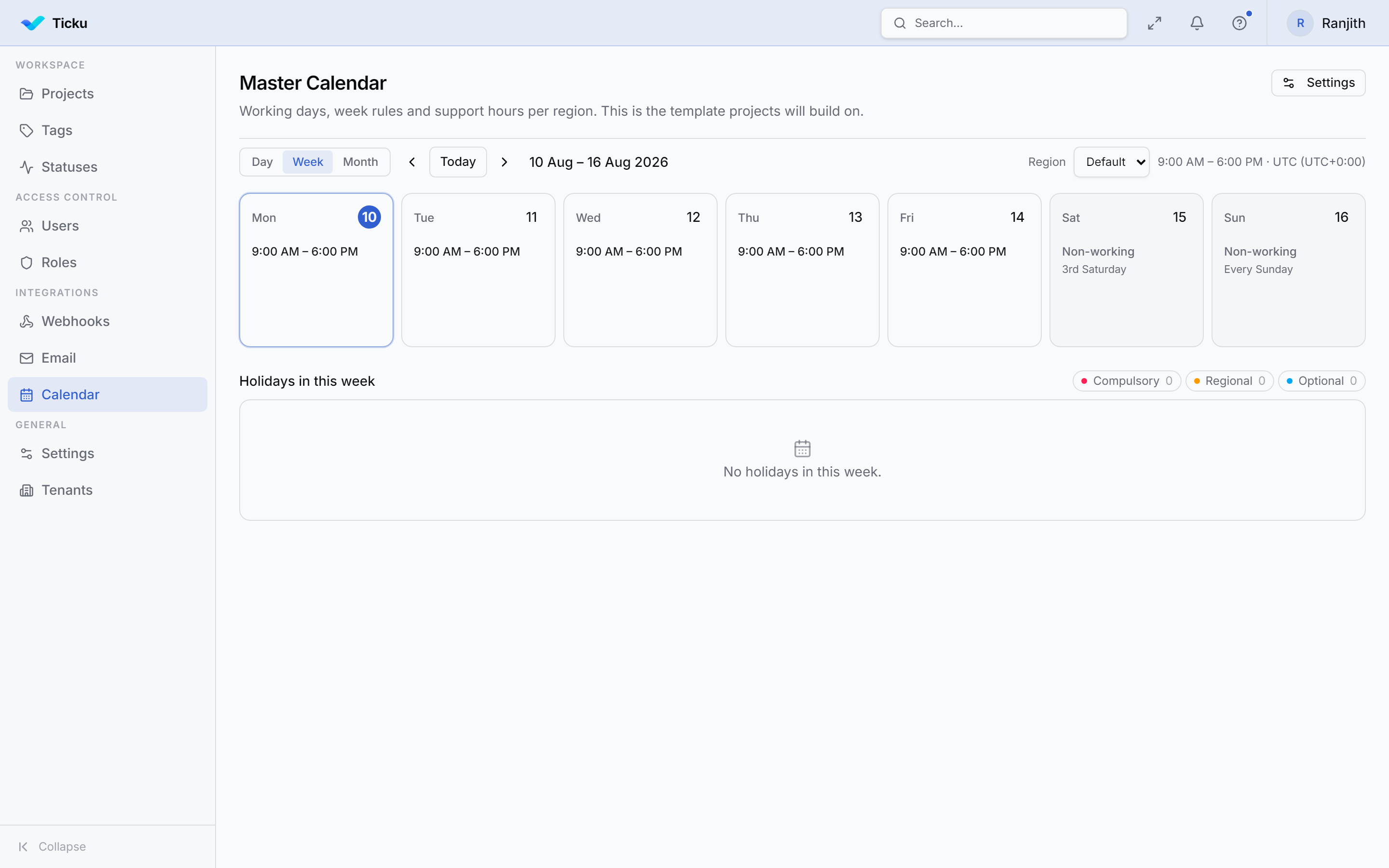
Regions
A region is a place your organization works from, with its own timezone and support hours — because these genuinely diverge (India works alternate Saturdays; the UAE takes Friday/Saturday). A tenant with a single location just uses one region.
| Setting | Notes |
|---|---|
| Name | e.g. "India", "UAE", "Default" |
| Timezone | IANA zone (e.g. Asia/Kolkata). Support hours are wall-clock times in this zone |
| Support hours | Start and end time, or mark the region 24×7 |
| Default region | Exactly one region is the default — the one the grid shows on load |
:::note Why hours are stored as minutes Support hours are stored as minutes from local midnight (09:00 = 540, 17:30 = 1050), not as timestamps — a timestamp for a wall-clock time carries a meaningless date that shifts under DST. :::
Weekend rules
Each region defines its non-working weekdays as a set of rules. A rule is an ordinal + a weekday, and the union of a region's rules is its weekend set. This expresses patterns a simple "Sat & Sun" toggle can't:
| Ordinal | Meaning |
|---|---|
| Every | Every occurrence of that weekday |
| 1st – 5th | That specific occurrence in the month |
| Last | The final occurrence in the month |
Example — "1st & 3rd Saturday off, every Sunday off" is three rules: 1st Sat, 3rd Sat, Every Sun.
:::caution "Last" is not always the 5th Most months have only four of any given weekday, so Last (28th–31st) is not the same as 5th. Use Last when you mean "the final one, whichever it is." :::
Holidays
Holidays are entered as dated, per-year rows (not recurrence rules) — real holidays move, so each year is entered explicitly.
| Holiday type | Effect |
|---|---|
| Compulsory | Company-wide — everyone is off |
| Regional | Observed only by the regions you attach |
| Optional | Floating/elective — shown, but does not force a non-working day |
Which regions observe a holiday
When adding a holiday you choose the regions that observe it. Leaving the region list empty means "all regions" — that's how a Compulsory holiday covers the whole tenant without enumerating every region, and it keeps one "Diwali" row covering several regions instead of duplicating it.
The calendar grid
The grid shows working vs non-working days for the selected region, combining its weekend rules and the holidays that apply to it. The week start (which weekday the grid's first column shows) is a display-only setting on the calendar and never changes which days are working.
Who can edit it
Viewing the calendar is available to any tenant member; creating/editing regions and holidays and changing settings requires tenant admin. See Roles & Permissions.
Related
- SLA Tracking — how deadlines are computed
- Project Types — SLA applies to Support projects